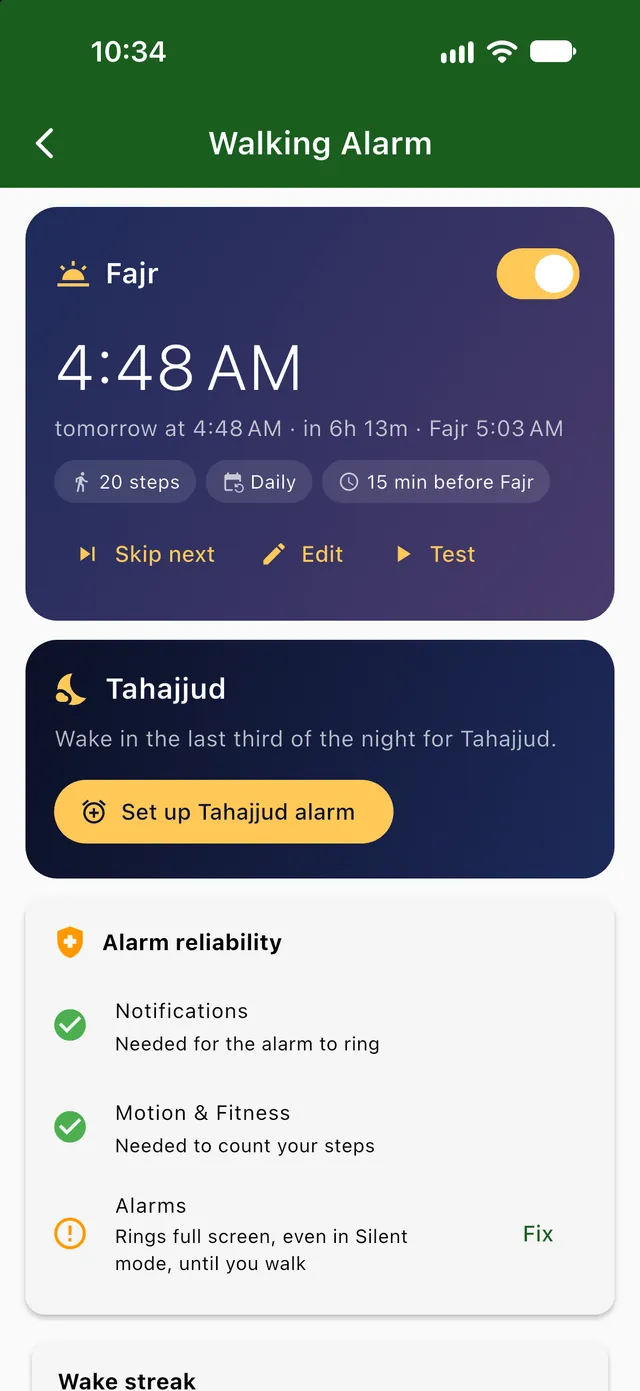
Islamic Tracker's walking Fajr alarm only stops after you get out of bed and walk a set number of steps, between 10 and 100, so you can't switch it off half-asleep and drift back to sleep. It rings a set number of minutes before Fajr for your location every morning, and it is free with no ads on Android and iPhone.
Get the walking Fajr alarm free
Free, no ads, no subscription. Walking alarms for Fajr and Tahajjud, prayer times with Adhan alerts and a Salah tracker, on Android and iPhone.
How the walking Fajr alarm works
- Choose when it rings. Pick how many minutes before Fajr, for example 15. The time moves with the real Fajr time for your location, so you never reset it as the seasons change.
- Set your step goal. Anything from 10 to 100 steps. The app shows roughly how far that is in metres.
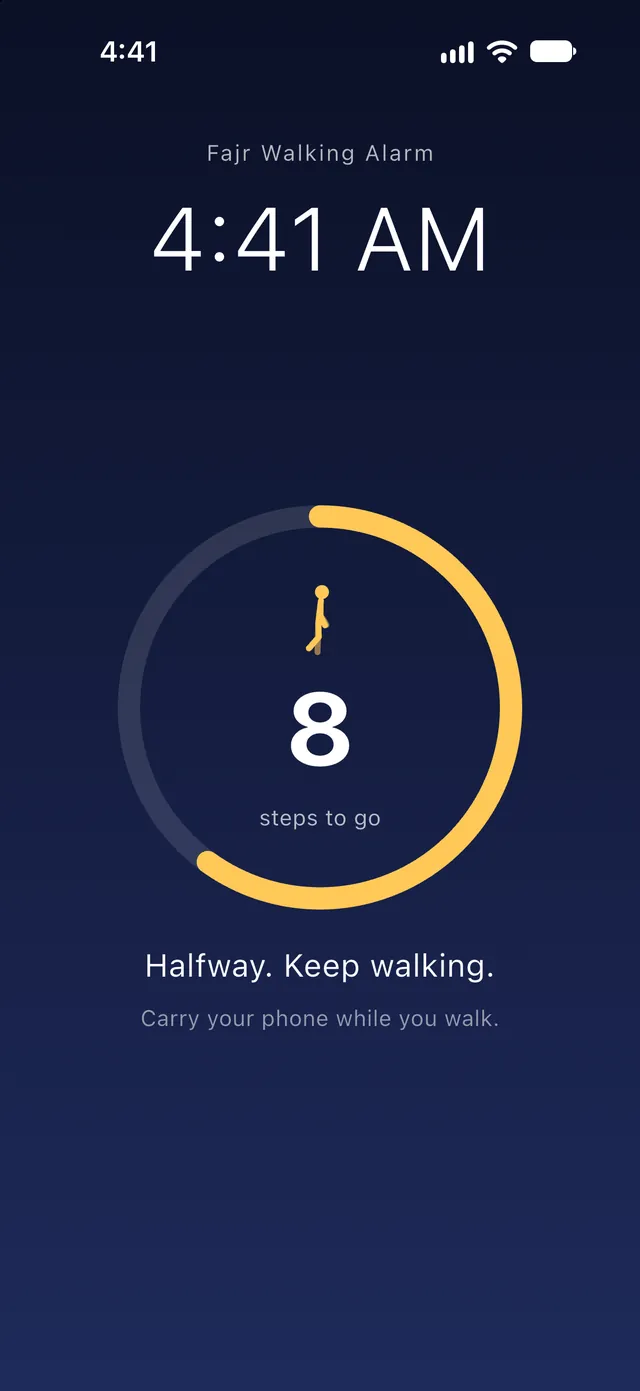
- The alarm rings full screen with an Adhan or a gentle chime, plus vibration if you want it.
- Walk to stop it. A counter shows the steps left. By the time it reaches zero you are standing, out of bed and awake enough to make wudu.
📲 Set your first walking Fajr alarm in under a minute. Get it free on Google Play or the App Store.
Settings you can change
Why walking beats snooze
Most missed Fajr prayers are not about the alarm failing to ring. They happen because the alarm is easy to silence while you are still half-asleep: one tap on snooze or stop, and you are back under the blanket. A walking alarm moves the decision to a moment when you are already up. Twenty steps is enough to get you to the bathroom or the prayer mat, and once you are standing, praying is the easy part.
The alarm is built so it can't be cheated easily:
- Shaking doesn't count. Movements faster than about four steps a second are ignored.
- No snooze button. The only normal way to stop it is to finish your steps.
- A hard emergency stop. It appears only after 3 minutes, and you have to hold a button for 5 seconds and type a code.
Walking alarm vs other ways to wake up for Fajr
| Normal phone alarm | Adhan notification | Walking Fajr alarm | |
|---|---|---|---|
| Follows the Fajr time | No, you reset it | Yes | Yes |
| Can be silenced half-asleep | Yes, snooze or stop | Yes, one tap | No, you must walk |
| Gets you out of bed | Not by itself | Not by itself | Yes |
| Tahajjud option | Manual | No | Yes, last third of the night |
Want to see other apps that make you get up for Fajr? Read our best Fajr alarm apps 2026 comparison.
Fajr times where you live
The alarm uses the same prayer times as the app, and the app picks the calculation method your country commonly uses, which you can change in Settings:
- Pakistan, India and Bangladesh: University of Islamic Sciences, Karachi.
- Saudi Arabia: Umm al-Qura. UAE, Kuwait, Qatar and Oman: each country's own method.
- Malaysia: JAKIM. Indonesia: Kemenag. Singapore: MUIS.
Daily timetables: UAE prayer times, jadwal sholat Indonesia and Bangladesh namaz time. This page is also available in Bahasa Indonesia, Bahasa Melayu, العربية, اردو and বাংলা.
Why Fajr matters
Fajr starts the day, and it is often the hardest prayer to keep. The Prophet ﷺ said that whoever prays Fajr is under the protection of Allah (Sahih Muslim 657). Many people find that once Fajr is steady, the rest of the day's prayers follow more easily. Pair the alarm with the app's Salah tracker: log Fajr each morning and watch your Fajr streak grow, or join the 40 Days of Fajr challenge.
Tips for waking up for Fajr
- Sleep earlier. No alarm fixes four hours of sleep.
- Start with 20 steps, then raise the goal if you still feel sleepy after stopping it.
- Leave the phone charging across the room, so the walking starts before the alarm even stops.
- Make wudu straight away once the steps are done.
- Track it. A visible Fajr streak is a strong reason not to miss tomorrow.
For more, read our guides on how to wake up for Fajr and how to wake up for Tahajjud.
Frequently asked questions
Is there a Fajr alarm that makes you walk?
Yes. Islamic Tracker has a walking Fajr alarm that keeps ringing until you walk a set number of steps, from 10 to 100 (20 by default). It is free, has no ads and works on Android and iPhone.
Can I snooze the walking Fajr alarm?
No. There is no snooze button. The alarm stops when you finish your steps. For real emergencies, an emergency stop appears after 3 minutes, and it asks you to hold a button for 5 seconds and type a code, so it is hard to use half-asleep.
Does shaking the phone count as steps?
No. Movements faster than about four steps a second are treated as shaking, not walking, and are ignored.
When does the Fajr alarm ring?
You choose how many minutes before Fajr it rings, from 5 to 240 minutes (15 by default), and it follows the Fajr time for your saved location every day. You can also set a fixed clock time instead.
Can I use it for Tahajjud too?
Yes. There is a separate Tahajjud walking alarm that can ring in the last third of the night, measured from Isha to Fajr or from Maghrib to Fajr, or at a fixed time.
What if I can't walk?
Turn on Accessible dismissal in the alarm settings. The alarm can then be stopped by holding a button instead of walking.
Related
Never sleep through Fajr again
Free, no ads, no subscription. The walking Fajr and Tahajjud alarms, prayer times with Adhan alerts, Quran, Zikr and prayer tracking with streaks.